
Network downtime is not just a tech annoyance. It slows employees down, disrupts phone calls, delays customer service, and makes a normal workday harder than it needs to be. For Metro Detroit businesses looking for network support Detroit teams can actually rely on, the real fix starts with finding where the breakdown is happening: Wi-Fi, switches, firewalls, ISP handoff, unmanaged devices, VoIP traffic, or the way everything connects together.
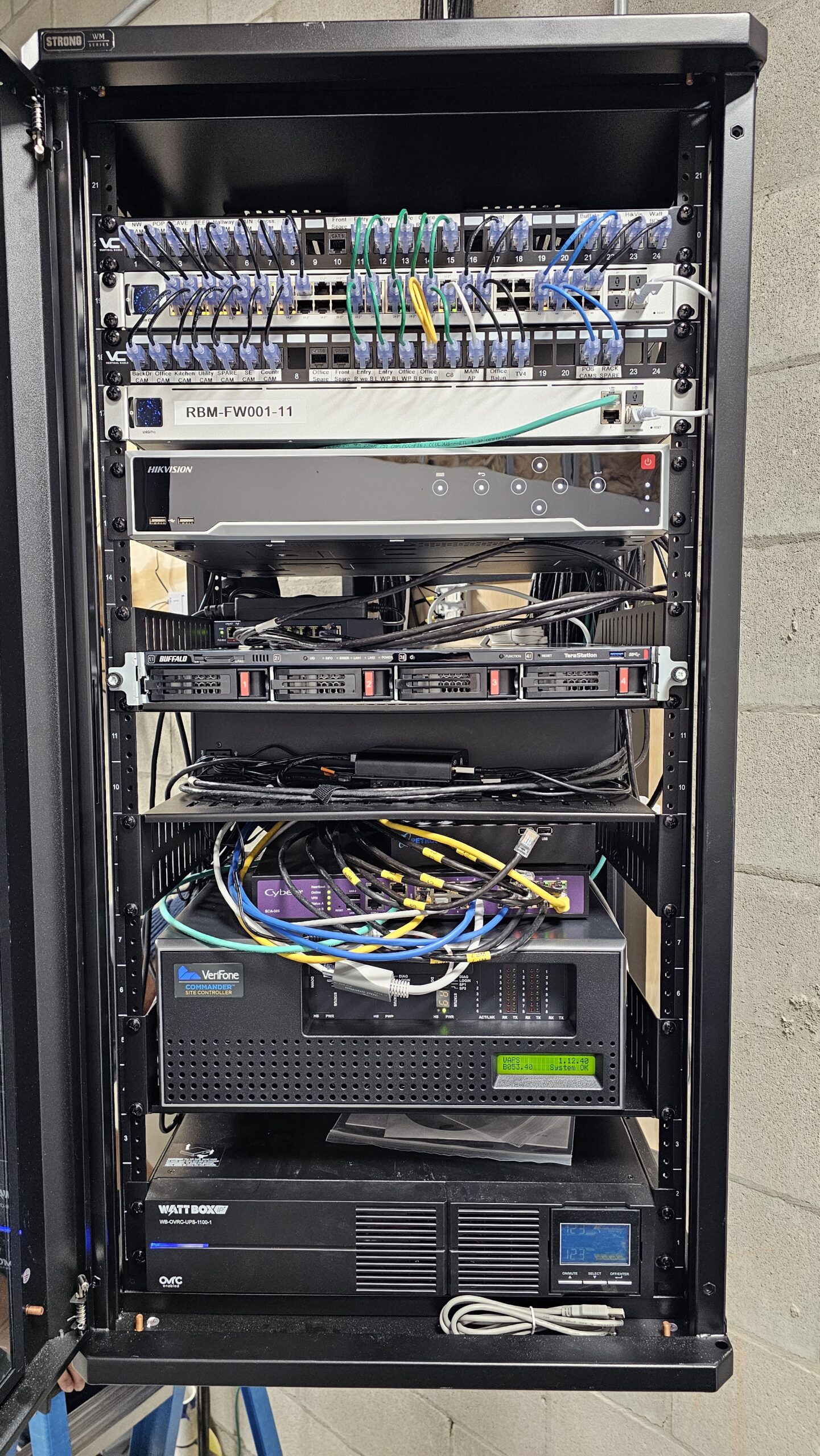
Downtime Often Starts Inside the Rack
This is where the network path comes together: patch panels, switches, firewall equipment, cabling, power, and connected systems. When one layer is messy, overloaded, undocumented, or failing, users feel it as slow Wi-Fi, dropped calls, frozen apps, or random disconnects.
Quick Summary
If your network keeps going down, guessing is expensive. You need visibility before you need another invoice.
Wi-Fi Problems Are Not Always an Internet Problem
When employees say “the internet is down,” they usually mean something feels slow, unstable, or unreliable. But that does not always mean the internet service itself failed.
Wi-Fi can struggle because access points are placed poorly, too many users are connected to the same signal, older hardware is overloaded, or the building layout is blocking coverage. In some offices, one area works fine while another area drops constantly. That points to coverage and design, not just internet speed.
Common Wi-Fi symptoms
Slow loading, dropped video calls, random disconnects, weak signal in certain rooms, or devices jumping between access points.
What to check first
Access point placement, device count, signal overlap, network usage, and whether business-critical systems have the priority they need.
Switches and Firewalls Can Cause Silent Downtime
Switches and firewalls are the traffic controllers of your business network. When they are misconfigured, outdated, overloaded, or unmanaged, problems can show up as slow systems, dropped connections, blocked services, or phones that cut in and out.
This is where downtime gets frustrating. The internet may technically be working. The Wi-Fi may technically be broadcasting. But the network still does not perform the way the business needs it to.
- Old switches can create bottlenecks between devices.
- Firewall rules can block tools, cloud platforms, or remote access.
- Unpatched firmware can create reliability and security concerns.
- Poor network segmentation can make everything compete on the same path.
- Missing documentation makes every future fix take longer.
The ISP Handoff Is Only One Part of the Story
It is easy to blame the internet provider first. Sometimes that is fair. A service outage, bad modem, weak handoff, or unstable circuit can absolutely create downtime.
But many businesses upgrade their internet plan and still have the same problems. That is usually because the real bottleneck is inside the business network.
Before upgrading the bill, check the path
- Is the ISP circuit stable?
- Is the modem or handoff equipment healthy?
- Is the firewall handling the traffic properly?
- Are switches overloaded or outdated?
- Are Wi-Fi access points placed and configured correctly?
- Are business phones, cameras, and cloud apps competing for bandwidth?
Unmanaged Devices Make Network Downtime Harder to Solve
A business network gets harder to support when no one knows what is connected, what changed, or who owns each piece of equipment. That includes old switches, personal routers, random access points, printers, cameras, phones, workstations, and devices added over time without a clean plan.
The biggest risk is not always the device itself. It is the lack of visibility. When there is no documentation, a simple problem becomes a long troubleshooting session.
What unmanaged networks create
More guessing, longer downtime, inconsistent performance, unclear ownership, and more frustration for employees.
What managed networks improve
Better visibility, cleaner troubleshooting, stronger planning, faster fixes, and fewer surprise weak points.
This is also where managed IT support can help. A good IT partner does not just react when something breaks. They help document, monitor, and improve the environment before every small problem becomes a bigger one.
VoIP Call Quality Depends on a Healthy Network
If your business phones run over the internet, your phone quality depends on your network. Crackling audio, dropped calls, delayed conversations, and one-way audio are often network symptoms.
A VoIP phone system needs stable bandwidth, clean routing, and proper traffic priority. Without that, calls have to compete with file downloads, video meetings, cameras, guest Wi-Fi, and cloud apps.
Signs your network may be hurting phone quality
- Calls drop during busy times of day.
- Audio cuts in and out when the office is full.
- Remote users have inconsistent call quality.
- Phones work better after-hours than during business hours.
- Calls sound worse when backups, uploads, or camera traffic are active.
When to Bring in Network Support Detroit Businesses Can Rely On
You do not need to wait until everything fails. The best time to review your network is when the warning signs start repeating.
If your team is dealing with slow Wi-Fi, dropped VoIP calls, inconsistent cloud access, firewall confusion, random disconnects, or a network closet nobody wants to touch, it is time for a closer look. Simply Technology helps Metro Detroit businesses review the full network path, from ISP handoff and firewall to switches, wireless, phones, and connected devices.
If cabling is part of the problem, it should be handled as one piece of the network conversation. Clean structured cabling helps, but downtime can also come from configuration, hardware, traffic flow, or lack of management. For a deeper look at cabling specifically, see our related guide on structured cabling installation in Detroit.
For broader business network planning, our network support Detroit services are built around one goal: keep your people connected, your tools working, and your technology easier to manage.
Network Downtime Diagram: Follow the Full Path
Downtime usually feels like one big problem, but the cause can start anywhere in the path. This diagram gives business owners a cleaner way to see what should be checked before guessing, replacing hardware, or upgrading the internet bill.
Where Network Downtime Starts
A simple view of the business network path: follow the connection from the internet handoff all the way to the people using phones, cloud apps, computers, cameras, and Wi-Fi.
ISP Handoff
Service enters the building here. Outages, unstable circuits, or bad handoff equipment can make everything downstream feel broken.
! unstable serviceFirewall
The firewall controls traffic. Bad rules, old firmware, overloaded hardware, or VPN problems can block work fast.
! blocked trafficSwitches
Switches connect the office. Failing ports, overloaded uplinks, or messy patching can create silent bottlenecks.
! bottlenecksWi-Fi Access Points
Wi-Fi can fail because of poor placement, interference, weak coverage, or too many users on the same access point.
! weak coverageDevices + VoIP
Phones, computers, cameras, printers, and cloud apps all compete for room when traffic is not managed well.
! call qualityIs it everyone, one area, one device type, or one app?
Check wired vs. Wi-Fi and phones vs. computers.
Follow the full path before replacing equipment.
Common Mistakes That Make Downtime Worse
Upgrading internet before checking the network
More speed does not fix poor Wi-Fi design, overloaded switches, or firewall configuration problems.
Letting undocumented devices pile up
Old equipment and mystery devices make troubleshooting slower and less accurate.
Treating VoIP as separate from the network
If your phones run on the network, call quality depends on the network being stable and properly prioritized.
Field Note from the Simply Team
“Most network problems are not fixed by guessing. We look at the full path first, then narrow it down so the customer knows what is actually causing the disruption.”— Simply Technology team member
Frequently Asked Questions
Why does my business internet keep going down?
Your internet service may be the problem, but downtime can also come from your firewall, switches, Wi-Fi access points, cabling, connected devices, or network configuration. The best next step is to check the full path instead of assuming the ISP is the only cause.
Can slow Wi-Fi cause VoIP phone problems?
Yes. If your VoIP phones rely on the same network and traffic is not managed properly, calls can drop, delay, or sound choppy. VoIP works best when the network is designed to prioritize call quality.
How do I know if my firewall or switch is causing downtime?
Signs include random disconnects, blocked tools, slow internal traffic, inconsistent cloud access, or problems that only affect certain areas or devices. A network review can check hardware health, configuration, firmware, traffic flow, and logs.
When should a Metro Detroit business get network support?
A business should get support when network problems repeat, affect employees, disrupt phone calls, slow down customer service, or make troubleshooting unclear. It is better to review the network before downtime turns into a larger business interruption.
Scannable Takeaways
- Network downtime is usually a business operations problem, not just a tech annoyance.
- Wi-Fi, firewalls, switches, ISP handoff, VoIP traffic, and unmanaged devices all need to be reviewed together.
- Cabling can be part of the problem, but it should not be the only thing you check.
- Good support starts with visibility, documentation, and clear troubleshooting.
- The faster you find the real cause, the faster your team gets back to work.
Need a Cleaner Network Path?
If your team is dealing with slow Wi-Fi, dropped VoIP calls, frozen cloud apps, or random disconnects, Simply Technology can help you find the real cause instead of guessing at the next fix.
Get Network Support